Fill your gallery without the busy work
No saving and uploading again
Your best sets are already on Instagram. Pick them there and they land in your gallery.
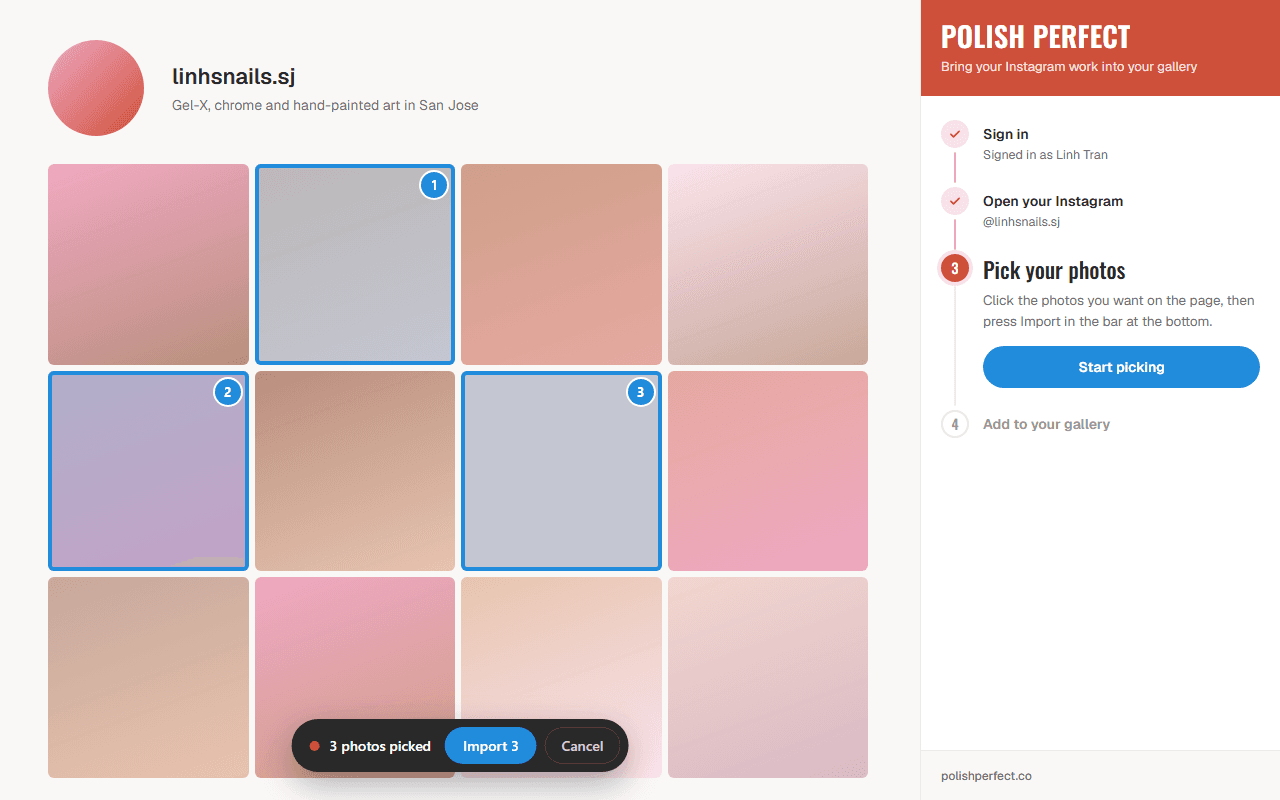
You choose every photo
Nothing comes over unless you click it. Skip the selfies and keep the nails.
Your captions come too
The words Instagram keeps with each photo are saved as its caption, up to 280 characters.
How it works
- 1
Add it to Chrome
Press Add to Chrome on this page. The Chrome Web Store opens. Press Add to Chrome there too.
- 2
Sign in
Open the extension. A panel opens on the side of your browser. Sign in with the same account you use on Polish Perfect.
- 3
Open your Instagram
Go to your Instagram profile page in the same window. The panel follows along on its own.
- 4
Pick your photos
Press Start picking. Click each photo you want. Then press Import in the bar at the bottom. You can bring in up to 20 photos at a time.
- 5
See them on your profile
Your photos go live on your Polish Perfect profile right away. The panel shows you which ones were added.
What it can and can't see
- It only runs on Instagram when you press Start picking.
- It never sees your Instagram password or your Polish Perfect password.
- It does not read your messages, your followers, or your account details.
- It sends us only the photos you pick. We copy them into your gallery.
- It has no ads and no tracking.
Questions
- Do I need a Polish Perfect profile first?
- Yes. The photos go into your nail tech profile, so make your profile first. Then sign in to the extension with that account.
- Does it work on my phone?
- No. It is a Chrome extension, so it works in the Chrome browser on a computer.
- Does it post or change anything on my Instagram?
- No. It only copies the photos you pick into your Polish Perfect gallery. Your Instagram stays the same.
- Can I take a photo down later?
- Yes. You can hide or delete any photo from your profile in your Polish Perfect dashboard.
- How many photos can I bring in?
- Up to 20 at a time. When those are in, press Import more photos and pick the next ones.
Your work is already on Instagram. Put it on your profile too.
Add to ChromeMore for nail techs
- How to create a tech profileStep by step, from sign-up to your first photos.
- Your nail tech profileWhat your profile is and how clients and salons find it.
- How to get reviewsPut reviews next to your photos so clients can trust your work.
- Jobs for nail techsA full gallery helps when you apply to a salon.